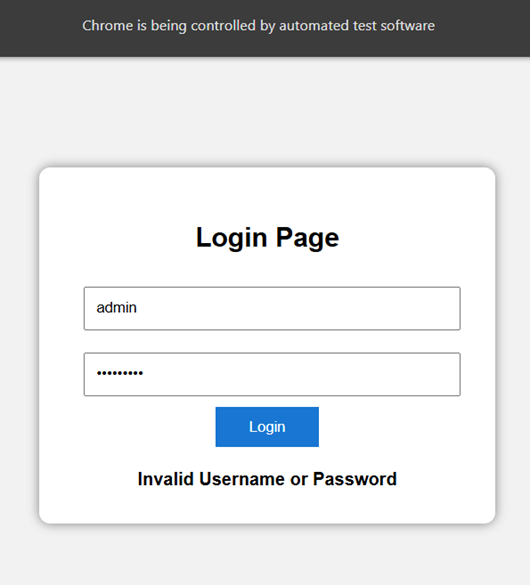
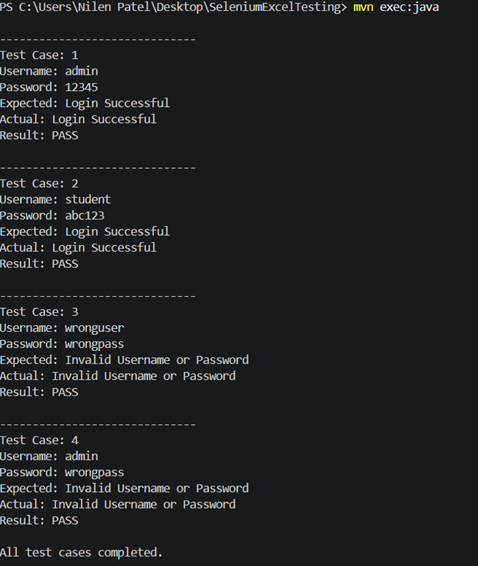
1. Project Structure
Create the following Maven project:
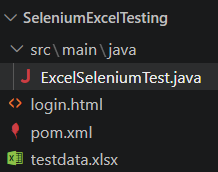
2. pom.xml
Use:
<?xml version="1.0" encoding="UTF-8"?>
<project xmlns="http://maven.apache.org/POM/4.0.0"
         xmlns:xsi="http://www.w3.org/2001/XMLSchema-instance"
         xsi:schemaLocation="http://maven.apache.org/POM/4.0.0
         https://maven.apache.org/xsd/maven-4.0.0.xsd">
    <modelVersion>4.0.0</modelVersion>
    <groupId>com.example</groupId>
    <artifactId>SeleniumExcelTesting</artifactId>
    <version>1.0</version>
    <properties>
        <maven.compiler.source>17</maven.compiler.source>
        <maven.compiler.target>17</maven.compiler.target>
    </properties>
    <dependencies>
        <!-- Selenium -->
        <dependency>
            <groupId>org.seleniumhq.selenium</groupId>
            <artifactId>selenium-java</artifactId>
            <version>4.49.0</version>
        </dependency>
        <!-- Apache POI -->
        <dependency>
            <groupId>org.apache.poi</groupId>
            <artifactId>poi-ooxml</artifactId>
            <version>5.5.1</version>
        </dependency>
    </dependencies>
    <build>
        <plugins>
            <plugin>
                <groupId>org.codehaus.mojo</groupId>
                <artifactId>exec-maven-plugin</artifactId>
                <version>3.5.0</version>
                <configuration>
                    <mainClass>ExcelSeleniumTest</mainClass>
                </configuration>
            </plugin>
        </plugins>
    </build>
</project>
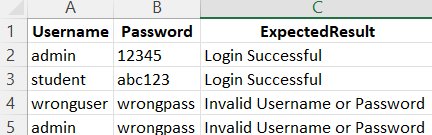
3. Create a sheet named:

Enter:
| Username | Password | ExpectedResult |
| admin | 12345 | Login Successful |
| student | abc123 | Login Successful |
| wronguser | wrongpass | Invalid Username or Password |
| admin | wrongpass | Invalid Username or Password |
So your Excel looks like:
4. Add below code in login.html file
<!DOCTYPE html>
<html>
<head>
    <title>Login Page</title>
    <style>
        body {
            font-family: Arial;
            background-color: #f2f2f2;
            text-align: center;
            margin-top: 100px;
        }
        .login-box {
            width: 350px;
            margin: auto;
            padding: 30px;
            background-color: white;
            border-radius: 10px;
            box-shadow: 0px 0px 10px gray;
        }
        input {
            width: 90%;
            padding: 10px;
            margin: 10px;
        }
        button {
            padding: 10px 30px;
            background-color: #1976d2;
            color: white;
            border: none;
            cursor: pointer;
        }
        #result {
            margin-top: 20px;
            font-weight: bold;
        }
    </style>
</head>
<body>
    <div class="login-box">
        <h2>Login Page</h2>
        <input
            type="text"
            id="username"
            placeholder="Username">
        <input
            type="password"
            id="password"
            placeholder="Password">
        <br>
        <button
            id="loginButton"
            onclick="login()">
            Login
        </button>
        <div id="result"></div>
    </div>
    <script>
        function login() {
            var username =
                document.getElementById("username").value;
            var password =
                document.getElementById("password").value;
            var result =
                document.getElementById("result");
            if (
                (username == "admin" && password == "12345") ||
                (username == "student" && password == "abc123")
            ) {
                result.innerHTML = "Login Successful";
            }
            else {
                result.innerHTML =
                    "Invalid Username or Password";
            }
        }
    </script>
</body>
</html>
5. Complete Java Program
import java.io.FileInputStream;
import java.nio.file.Path;
import java.nio.file.Paths;

import org.apache.poi.ss.usermodel.DataFormatter;
import org.apache.poi.xssf.usermodel.XSSFSheet;
import org.apache.poi.xssf.usermodel.XSSFWorkbook;

import org.openqa.selenium.By;
import org.openqa.selenium.WebDriver;
import org.openqa.selenium.WebElement;
import org.openqa.selenium.chrome.ChromeDriver;

public class ExcelSeleniumTest {

    public static void main(String[] args) throws Exception {

        // Open Excel file
        FileInputStream file =
                new FileInputStream("testdata.xlsx");

        // Create workbook
        XSSFWorkbook workbook =
                new XSSFWorkbook(file);

        // Get sheet
        XSSFSheet sheet =
                workbook.getSheet("LoginData");

        // Read Excel values as text
        DataFormatter formatter =
                new DataFormatter();

        // Start Chrome
        WebDriver driver =
                new ChromeDriver();

        driver.manage().window().maximize();

        // Open login.html
        Path htmlFile =
                Paths.get("login.html").toAbsolutePath();

        driver.get(
                htmlFile.toUri().toString()
        );

        // Read Excel data row by row
        for (int i = 1;
             i <= sheet.getLastRowNum();
             i++) {

            String username =
                    formatter.formatCellValue(
                            sheet.getRow(i).getCell(0)
                    );

            String password =
                    formatter.formatCellValue(
                            sheet.getRow(i).getCell(1)
                    );

            String expectedResult =
                    formatter.formatCellValue(
                            sheet.getRow(i).getCell(2)
                    );

            System.out.println();
            System.out.println("------------------------------");
            System.out.println("Test Case: " + i);
            System.out.println("Username: " + username);
            System.out.println("Password: " + password);
            System.out.println(
                    "Expected: " + expectedResult
            );

            // Enter username
            WebElement usernameBox =
                    driver.findElement(
                            By.id("username")
                    );

            usernameBox.clear();

            usernameBox.sendKeys(username);

            // Enter password
            WebElement passwordBox =
                    driver.findElement(
                            By.id("password")
                    );

            passwordBox.clear();

            passwordBox.sendKeys(password);

            // Click Login
            driver.findElement(
                    By.id("loginButton")
            ).click();

            // Read actual result
            String actualResult =
                    driver.findElement(
                            By.id("result")
                    ).getText();

            System.out.println(
                    "Actual: " + actualResult
            );

            // Compare results
            if (actualResult.equals(expectedResult)) {

                System.out.println(
                        "Result: PASS"
                );

            } else {

                System.out.println(
                        "Result: FAIL"
                );
            }
        }

        // Close Excel
        workbook.close();

        file.close();

        System.out.println();
        System.out.println(
                "All test cases completed."
        );

        System.out.println(
                "Press ENTER to close browser..."
        );

        System.in.read();

        // Close browser
        driver.quit();
    }
}
6. Compile the project
Run:
mvn compile

Then:
mvn exec:java