Create a Maven project
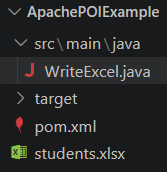
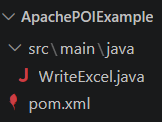
- Create this folder:
ApachePOIExample

- Inside it create:
3. Create pom.xml
Put this inside pom.xml:
<?xml version="1.0" encoding="UTF-8"?>
<project xmlns="http://maven.apache.org/POM/4.0.0"
         xmlns:xsi="http://www.w3.org/2001/XMLSchema-instance"
         xsi:schemaLocation="http://maven.apache.org/POM/4.0.0
         https://maven.apache.org/xsd/maven-4.0.0.xsd">
    <modelVersion>4.0.0</modelVersion>
    <groupId>com.example</groupId>
    <artifactId>ApachePOIExample</artifactId>
    <version>1.0</version>
    <properties>
        <maven.compiler.source>17</maven.compiler.source>
        <maven.compiler.target>17</maven.compiler.target>
    </properties>
    <dependencies>
        <dependency>
            <groupId>org.apache.poi</groupId>
            <artifactId>poi-ooxml</artifactId>
            <version>5.5.1</version>
        </dependency>
</dependencies>
</project>
poi-ooxml is required because you are creating an .xlsx Excel file using XSSFWorkbook.
4. Create WriteExcel.java
Put your code here:
src\main\java\WriteExcel.java
import java.io.FileOutputStream;
import org.apache.poi.xssf.usermodel.XSSFWorkbook;
import org.apache.poi.xssf.usermodel.XSSFSheet;
import org.apache.poi.xssf.usermodel.XSSFRow;
public class WriteExcel {
    public static void main(String[] args) throws Exception {
        XSSFWorkbook workbook = new XSSFWorkbook();
        XSSFSheet sheet = workbook.createSheet("Students");
        XSSFRow row1 = sheet.createRow(0);
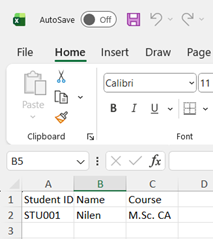
        row1.createCell(0).setCellValue("Student ID");
        row1.createCell(1).setCellValue("Name");
        row1.createCell(2).setCellValue("Course");
        XSSFRow row2 = sheet.createRow(1);
        row2.createCell(0).setCellValue("STU001");
        row2.createCell(1).setCellValue("Nilen");
        row2.createCell(2).setCellValue("M.Sc. CA");
        FileOutputStream file =
                new FileOutputStream("students.xlsx");
        workbook.write(file);
        file.close();
        workbook.close();
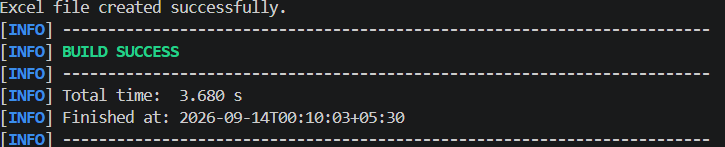
        System.out.println("Excel file created successfully.");
    }
}
6. Open Command Prompt in the project folder
For example:
cd C:\Users\Nilen Patel\Desktop\ApachePOIExample
Then run:
mvn compile

Maven will automatically download Apache POI and its required dependencies.
7. Run the program
After compilation:
mvn exec:java -Dexec.mainClass=”WriteExcel”